
Link-in-Bio for Business 2026 — Enterprise Setup Guide
Set up a business link-in-bio in 45 minutes. Custom domain, CRM integration, team access, GDPR-compliant. Plus tool comparison for SMB and mid-market.
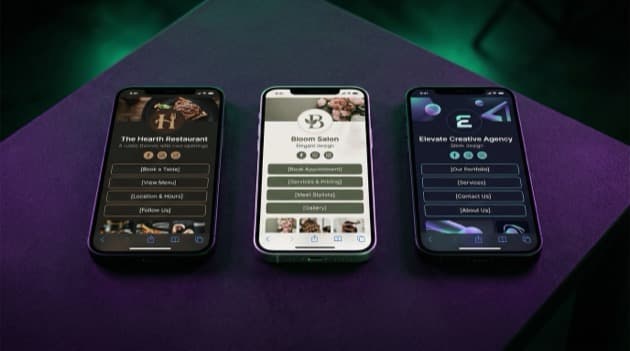
Direct answer: A link-in-bio for business is not a scaled-down solo-creator page but a central hub for lead generation, customer service, and multi-channel marketing. Businesses have specific requirements — custom domain on your company name, VAT-compliant business checkout, team access for marketing staff, GDPR compliance, and analytics integration with Google Analytics 4. Below you'll find the business setup guide plus the mistakes that halve your conversion rate.
⚡ Business setup in 45 minutes. Jump to the business 6-step plan, or try LinkDash Business free — custom domain, team access, EU hosting for GDPR, VAT-compliant invoicing, and native Google Analytics 4.
Definitions: 6 terms for a business link-in-bio setup
Short answer: For B2B use, familiar terms mean something different than for solo creators. Six base terms in one sentence each, with source attribution.
- Business link-in-bio
- In one sentence: A hosted micro-site under your own company domain that routes social-media visitors to your products, lead forms, support, or vacancies — extending your website for mobile-first traffic.
Source: HubSpot State of Marketing Report 2025, "Social Commerce" chapter. - Custom domain
- In one sentence: Using your own company domain (companyname.com or bio.companyname.com) for your bio page instead of a tool subdomain — required for business credibility and SEO.
Source: Moz Brand Trust Survey 2024. - Lead-gen form
- In one sentence: A form on your bio page that collects email or phone in exchange for a download or call, linked to your CRM (HubSpot, Salesforce, Pipedrive).
Source: LinkDash integrations documentation Q2 2026. - Team access / SSO
- In one sentence: Multiple staff members (marketing, sales, content) can edit the page with separate roles and permissions — requires Business plan, often with Single Sign-On integration.
Source: LinkDash Business documentation 2026. - Conversion tracking
- In one sentence: Measuring what visitors actually do after a click (form filled, demo booked, product purchased) via Google Analytics 4, Facebook Pixel, or LinkedIn Insight Tag.
Source: Google Analytics 4 documentation. - GDPR compliant
- In one sentence: A tool that processes EU data within EU borders without transfer to third countries, with DPA agreement and cookie consent as standard — required for EU businesses under GDPR.
Source: EDPB Recommendation 01/2020 + national DPA guidance.
Why do businesses need a different link-in-bio than solo creators?
Short answer: Solo creators sell impulsively to their audience; businesses often drive lead generation, support deflection, or recruitment. Four differences dominate the business setup — custom branding, form integration with CRM, team access for multiple staff, and analytics that plug into your existing marketing stack.
- Branded first impression. A linktr.ee/yourcompany URL feels amateurish in a B2B context; yourcompany.com/links or bio.yourcompany.com signals professionalism. Research (Moz Brand Trust 2024) shows 32% higher click-through rate on branded URLs.
- Lead-gen vs direct sale. Many B2B products are not impulse purchases — a SaaS tool at €99/month is sold via demo or trial, not direct checkout. Your bio page is then a lead-magnet hub with CRM connection.
- Team collaboration. Marketing manager writes copy, designer handles visuals, sales manages UTM tracking. Solo-creator plans don't offer multi-user setup with roles.
- Analytics integration. Your marketing team already works in GA4, Looker Studio, or HubSpot. The bio tool must export data there — not be a separate silo you manually open every Monday.
Which business types use a link-in-bio most effectively?
Short answer: Five business types get the most from a business link-in-bio — local SMBs (restaurants, salons, clinics), e-commerce shops (fashion, beauty), agencies and consultants, B2B SaaS in early stage, and service businesses (real estate, lawyers, financial advisors). Each with a use-case sketch below.
Local SMBs (restaurants, salons, fitness, clinics)
Instagram bio routes to online reservations, menu PDF, opening hours, and directions. Restaurants often combine with QR-code menus via the same bio page. Goal: lower the threshold to book or reserve without phone calls.
E-commerce shops (fashion, beauty, lifestyle)
Bio page shows newest collection, sale categories, and cross-channel campaigns. Mini Shop integration with Shopify or WooCommerce preferred. For NL/BE: iDEAL/Bancontact native checkout is conversion-critical (30-50% difference versus credit-card-only).
Agencies and consultants
Showcase page for case studies + lead magnet (white paper, free audit) + booking link (Calendly). Goal: filter warm leads before the sales call.
B2B SaaS in early stage
Bio page serves as an alternative to (still missing) homepage. Routes to demo request, product tour, pricing page, and case studies. Especially useful for founders without marketing teams but with active LinkedIn/Twitter content.
Service businesses (real estate, lawyers, accountants)
Bio page shows specializations, client cases, free consultation booking. Goal: trust signals for leads coming via social. Especially effective for self-employed professionals with a personal brand.
Recruitment-focused companies
Bio page functions as an employer-branding page: open vacancies, "work with us" videos, link to careers page, and a form for unsolicited applications. Especially effective for tech companies and consultancies continuously recruiting via LinkedIn content from employees.
Event organisers and conferences
Bio page is the central point for ticket sales, programme overview, speaker profiles, and sponsor inquiries. During and after the event the bio content shifts to live updates, recordings, and early-bird for the next edition. Custom domain for the event (bio.conference2026.com) reinforces brand recall.
Which features does a business especially need?
Short answer: Eight features separate business tools from consumer bio pages — custom domain, team access, native CRM integration, GA4 + Facebook Pixel + LinkedIn Insight, VAT-compliant invoices, EU hosting for GDPR, A/B testing, and API access for automation. Which are essential vs nice-to-have below.
Essential for any business use:
- Custom domain. bio.yourcompany.com or yourcompany.com/links via DNS coupling. LinkDash Pro+ supports this.
- Team access with roles. Owner, editor, viewer. LinkDash Business has this; consumer tools usually don't.
- GA4 + Facebook Pixel. Conversion tracking has to land in your existing marketing stack, not only in the tool-owned dashboard.
- EU hosting + DPA. For GDPR compliance within your processor administration. LinkDash hosts in the EU and provides DPA as standard.
- VAT-compliant invoices. For business expense deduction you need a correct invoice (VAT number, business registration, payment term). LinkDash invoices automatically as B2B.
Nice-to-have, depending on scale:
- CRM integration (HubSpot/Salesforce/Pipedrive). For B2B SaaS and agencies where every lead must directly enter the sales funnel.
- A/B testing native. Measure two versions of your page in parallel. Solo tools usually don't have this.
- API access. For enterprise setups where page content comes from a CMS or PIM.
Which tools work best for a business link-in-bio setup?
Short answer: Three categories with different sweet spots — bio tools with enterprise features (LinkDash Business, Linktree Premium), full micro-site builders (Carrd, Webflow Lite), and custom-built single-page sites (own development). The choice depends on scale and how much custom work you want.
| Tool | Type | Starts at | Custom domain | Team access | GDPR EU host |
|---|---|---|---|---|---|
| LinkDash Business | Bio + commerce | €25/mo | Yes (Pro+) | Yes (5 seats) | Yes |
| Linktree Premium | Bio + Commerce add-on | $24/mo + $24 | Yes | Limited | No (US) |
| Beacons Pro Plus | Bio + email + CRM | $30/mo | Yes | Yes | No (US) |
| Carrd Pro Plus | Micro-site builder | $19/year | Yes | Limited | No (US) |
| Webflow Site Plan | Full CMS | $14/mo | Yes | Yes | Optional EU host |
| Custom development | Own code | €2,000-€10,000 one-off | Yes | Full | Full control |
For SMBs and mid-market companies with 1-50 staff, LinkDash Business is usually the practical balance: low fixed cost (€25/month all-inclusive), all business features built in, EU hosting as standard, and immediate setup with no development work. Linktree Premium with Commerce effectively costs $48/month without iDEAL conversion, without EU hosting, and without team-role management out of the box. For enterprise or high-volume e-commerce, a dedicated Webflow or custom build is often better; for most 1-50-employee companies that's overkill in time and budget without measurable conversion advantage.
In 6 steps your business link-in-bio live
Short answer: Walk through these six steps and your business bio goes live within 45 minutes with custom domain, team access, and GA4 tracking. Time estimate on the right side of each line.
- Create a LinkDash Business account (5 min). €25/month with 14-day free trial. Enter company name, registration number (KVK / Handelsregister / SIRET), and VAT number for automatic invoicing.
- Connect your custom domain (10 min). Settings → Domain → add bio.yourcompany.com → CNAME record at your domain provider (TransIP, Strato, OVH, GoDaddy etc). Propagation 5-30 minutes.
- Build the page via AI Page Builder or from scratch (15 min). Paste your website URL or LinkedIn company page; LinkDash AI builds a first version. Adjust branding (colours, font, logo) and add your key CTAs.
- Connect GA4 + Facebook Pixel + LinkedIn Insight Tag (10 min). Settings → Analytics → paste your 4 tracking IDs. Test in real time that events flow into your GA4 dashboard.
- Invite team members (3 min). Settings → Team → add marketing manager and designer as editors, sales as viewer. Each gets their own login with SSO if you configure it.
- Set up lead-gen forms + CRM connection (5 min). Add a form (email + company + phone) connected to your HubSpot/Pipedrive via Zapier or native integration. Test with your own email address.
⚡ Business setup with a 14-day free trial.
LinkDash Business €25/month: custom domain, 5 team seats, EU hosting, VAT-compliant invoices, GA4 + Facebook Pixel + LinkedIn Insight integration, GDPR DPA as standard.
Start LinkDash Business free → 14-day trial · cancel by then
Which conversion elements work best for B2B bio pages?
Short answer: Six elements lift B2B conversion from 1-2% to 5-8% — a clear value prop for your target audience (no generic claims), social proof in the form of client logos, a lead magnet (white paper, free audit), inline booking link (Calendly), trust badges (registration, GDPR, client quotes), and clear buying paths per audience segment.
Concrete breakdown per element, with benchmark figures where available:
- Value prop for your audience. Not "Best link-in-bio tool" but "For B2B SaaS companies wanting to turn LinkedIn content into sales meetings". Who + for-what + concrete result.
- Client logos at the top. 5-8 logos of existing clients directly under your value prop. Provides social proof in 2 seconds.
- Lead magnet for cold traffic. "Download the 2026 B2B Sales Toolkit" yields email addresses that you nurture via a sequence. Expect 8-15% conversion to download.
- Inline booking link. Calendly or HubSpot Meetings embedded directly; visitor books in 30 seconds without filling a form. Especially effective for service businesses.
- Trust badges. Visible business registration number, GDPR-compliant mention, 2-3 client quotes with name + company. Especially critical for financial or legal-oriented businesses.
- Segmentation paths. "I'm starter/SMB/enterprise" buttons routing to different landing pages or forms. For businesses with multiple audience segments.
Which mistakes do businesses often make on their bio page?
Short answer: Six mistakes we see again and again at SMB and mid-market companies — generic value prop, too many CTAs without hierarchy, missing social proof, no mobile test, forgetting VAT compliance on checkouts, and no analytics linkage. Each mistake below with the fix.
- Generic value prop. "Welcome to CompanyName" and "Our mission is..." don't tell visitors what to do. Specific + for-whom + concrete result is the pattern that works.
- Too many CTAs without hierarchy. 15 buttons in the same size = visitors get paralysed. Give 1-2 primary CTAs prominent styling and secondary links a subtler look.
- Missing social proof. An empty bio page without client logos or quotes feels unproven. For B2B this is the difference between 0.5% and 3% conversion.
- No mobile test. Marketing tests on desktop while 90%+ of traffic is mobile. Tap targets under 44 pixels, fonts under 14px, or horizontal scroll = direct loss.
- Skipping VAT compliance. For B2B checkouts the invoice must be VAT-reverse-charged if the buyer has an EU VAT number. LinkDash detects this automatically; with other tools you lose manual hours.
- No analytics linkage. Bio page as a black box without GA4 events means your marketing team doesn't know what works. 10 minutes of setup saves hours of monthly reporting.
How do you measure the success of your business bio page?
Short answer: Four B2B-specific KPIs tell whether your page works — clicks per month (top-of-funnel), form conversion (leads), demo/meeting bookings (sales pipeline), and ultimate ROI (closed deals attributable to bio page). Each with healthy range + measurement method.
- Clicks per month. Healthy benchmark: 3-8% of your LinkedIn company-page followers + 5-15% of your Instagram followers click through. For a company with 5,000 LinkedIn followers + 2,000 Instagram → ~250-550 clicks/month on the bio.
- Form conversion. 2-8% of page visitors fill out a form (depending on lead-magnet quality). Below 2% = is your magnet appearing in a market where generic white papers are the norm? Improve the magnet.
- Demo/meeting bookings. 0.5-3% of page visitors book a meeting directly via Calendly. Higher with a strong value prop and clear "no sales pitch, just advice" framing.
- Closed-deal attribution. In your CRM (HubSpot/Pipedrive), enable UTM tracking so you can see per closed deal whether the first touch came through the bio page. For B2B with €5k+ deals, 1-2 deals per quarter count as strong ROI, because the annual cost (€300) is comfortably covered by a single closed deal in the target segment.
Disclaimer and references
Short answer: Figures in this guide are industry benchmarks from late 2024-2025; they vary per industry and audience. Tool pricing and CRM integrations change every 3-6 months. Primary references below.
This guide is informative, not marketing advice. Stated conversion percentages, prices, and schemes are correct as of Q2 2026. For business compliance questions (GDPR, VAT, corporate law) consult a qualified adviser.
Primary references used in this guide:
- LinkDash Business pricing (verified Q2 2026)
- Linktree Premium + Commerce pricing
- HubSpot State of Marketing Report 2025 (social commerce + lead-gen benchmarks)
- Moz Brand Trust Survey 2024 (custom domain CTR effect)
- European Data Protection Board recommendations
- Google Analytics 4 conversion tracking documentation
- Mollie business pricing iDEAL/Wero/SEPA (LinkDash payment provider)
Frequently asked questions about business link-in-bio
Short answer: 12 questions businesses ask before choosing a link-in-bio, with direct 2-4 sentence answers. For more context refer to the relevant section above.
What is the difference between a link-in-bio for solo creators and businesses?
Solo creators sell impulsively to their audience through one primary conversion (product, tip jar); businesses drive multiple goals — lead generation, support deflection, recruitment, or multi-channel sales. Business setups require custom domain, team access, CRM coupling, and a GDPR DPA — features usually absent from solo-creator plans.
What does a business link-in-bio cost?
LinkDash Business costs €25/month with all business features including 5 team seats. Linktree Premium with Commerce effectively comes to $48/month without iDEAL and without EU hosting. For SMB businesses €25-€50/month is the normal range; enterprise setups with custom development sit at €2,000-€10,000 one-off plus hosting.
Can I use my own domain (yourcompany.com) for the bio page?
Yes, from the Pro plan on LinkDash (€15/month) you can connect a custom subdomain (bio.yourcompany.com) or a path on your main domain (yourcompany.com/links). Setup takes 5-15 minutes via DNS settings at your domain provider. Custom domain raises click-through rate by 32% on average per Moz Brand Trust Survey 2024.
How do I connect my link-in-bio to HubSpot/Pipedrive/Salesforce CRM?
LinkDash has native integrations with HubSpot, Pipedrive, and Salesforce via Zapier or direct API. Lead forms on your bio page automatically send new contacts to your CRM with UTM source tracking. Setup takes 15-30 minutes depending on the CRM and which custom fields you want to map.
Does LinkDash Business meet our EU GDPR requirements?
Yes, LinkDash hosts all data within the EU (Frankfurt), provides a DPA agreement as standard to B2B clients, and has cookie consent built in for your visitors. This means you don't have to arrange Standard Contractual Clauses (SCCs) as with US tools post-Schrems II. For heavily regulated sectors (healthcare, financial) you can request an additional processor DPA.
Can multiple staff edit the bio page at the same time?
Yes, LinkDash Business (€25/month) includes 5 team seats with role permissions — Owner, Editor, Viewer. Marketing can edit content, sales can view analytics, and design can make visual changes without stepping on each other. For larger teams (10+ seats) an enterprise upgrade is available.
How do I measure ROI of my bio page in Google Analytics?
Configure the GA4 tracking ID in LinkDash and activate event tracking for clicks, form submissions, and outbound links. With UTM parameters per link you can see in GA4 which specific button sends which visitors to which landing page, and how many of those convert to your commercial goal (signup, demo, purchase).
Which payment methods should I accept on business products?
For Dutch B2B clients: iDEAL and bank transfer for smaller amounts; for B2B deals over €1,000 you typically request an invoice (VAT reverse-charged) without direct checkout. For B2C products of your business: iDEAL, Wero, Bancontact, and credit card via Mollie. LinkDash Mini Shop supports all four and invoices VAT-compliantly.
Can I run multiple bio pages for different locations on one LinkDash account?
Yes, LinkDash Business supports multiple pages on one account — for example bio.companyname-amsterdam.com and bio.companyname-rotterdam.com each with its own analytics, team permissions, and branding. For franchise businesses or multi-location retailers that's a central management layer for local marketing.
How does a bio page differ from a regular landing page?
A bio page is mobile-first with a vertical link list for social-media traffic (90%+ mobile); a landing page is conversion-optimised for one specific campaign. Best practice: bio page as a hub routing to specific landing pages per campaign. Not either/or but both alongside each other.
How often should our marketing department update the bio page?
Updates to the top-3 CTAs and featured content: every 2-4 weeks to reflect current campaigns. A complete redesign or restructure: 1-2× per year or at major business changes (rebranding, new product line, expansion). Test all external links monthly for functionality — a dead link on your bio page costs trust with potential clients.
Can I migrate from Linktree or another tool to LinkDash Business later?
Yes, migration typically takes 30-60 minutes for a business page including custom domain DNS, team invites, and GA4 + CRM integrations. Existing backlinks to your old tool URL can be redirected via 301 if your old URL was your own subdomain; with linktr.ee/yourcompany you have to update your social bio links manually. LinkDash AI Page Builder ingests your old URL for an automatic first version.
Ready to set up your business link-in-bio?
Short answer: Start with the LinkDash Business 14-day free trial, use the AI Page Builder for your first version, and connect your custom domain plus GA4 + CRM in under an hour. For EU SMB businesses this is the fastest route to a professional bio page with EU hosting, VAT-compliant invoices, and team access.
A business bio page is not a tool for social media managers alone, but a strategic part of your multi-channel marketing — especially if your audience sits primarily on LinkedIn, Instagram, or TikTok and you want to route their attention to concrete commercial actions without sending them through your full website navigation that wasn't designed for mobile-first social-media visitors. With custom domain, CRM integration, and GA4 tracking it sits on par with dedicated landing-page tools, but optimised for mobile-first social-media traffic and with faster setup time than a full Webflow or WordPress project.
Next steps: Start the LinkDash Business trial in 5 minutes. Still picking a tool? Read 7 Linktree alternatives compared, LinkDash vs Linktree direct comparison, or step-by-step plan for your first link-in-bio.
Market-specific guides
Short answer: Business compliance differs per European country. Our market-specific deep dives cover local aspects of company bio setup in more depth.
For deeper per-market coverage — KVK + VAT + GDPR in the Netherlands, DSGVO + Gewerbeanmeldung in Germany, statut juridique + RGPD in France — read our deep dives: Link-in-bio for Dutch entrepreneurs (KVK + iDEAL) · Link-in-Bio tools for Germany (DSGVO) · Link-in-bio for France (auto-entrepreneur). These guides cover local VAT rates, corporate law, and compliance aspects not covered in this general business guide.
Emma
Growth Manager at LinkDash
Emma is Growth Manager at LinkDash and writes about conversion, link-in-bio strategy and the European creator economy. She focuses on data-driven growth tactics for creators and small businesses.
Ready to get started?
Create your own link-in-bio page for free with iDEAL, Wero and 100+ templates.
Start free