
Bio link for podcasters: all apps in one place + Patreon + tip jar
Learn how to build a bio link as a podcaster that combines Spotify, Apple Podcasts, transcripts, and monetization. Practical guide with embed codes and conversion tips.
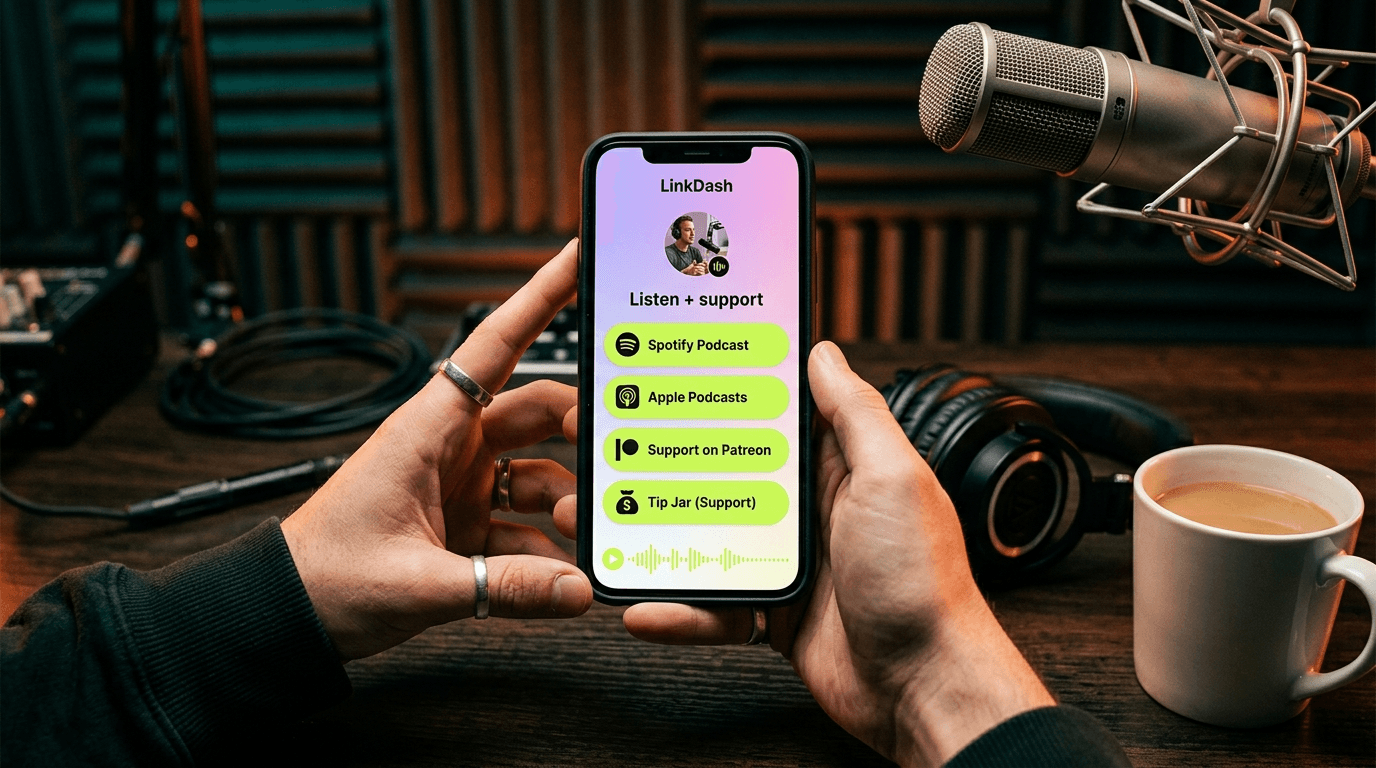
Direct answer: As a podcaster, you're losing listeners because they have to choose between six different podcast apps — and most drop off before they even click. A bio link solves this: one URL with all listening options, your latest episodes, transcripts for SEO, and monetization via Patreon or a tip jar. In our coaching data, we see that podcasters with an optimized bio page generate 40-60% more cross-platform followers than those who only share their Spotify link. The key? Make it as easy as possible to listen and to pay.
⚡ Ready to build your podcast bio? With LinkDash, you can add Spotify embeds, Apple Podcasts links, and Patreon tiers in minutes. Try LinkDash free — no credit card required.
Why podcasters need a dedicated bio link strategy
Short answer: Podcast distribution is fragmented across 10+ platforms, and every listener has a different favourite app.
Unlike YouTubers or TikTokers, you don't have a "home base" where all your content lives. Your show exists on Spotify, Apple Podcasts, YouTube Music (formerly Google Podcasts), Overcast, Pocket Casts, Castro, and a dozen other apps. According to Edison Research's Infinite Dial 2024 report, 47% of Americans aged 12+ listen to podcasts monthly, but they're spread across at least five major platforms.
This fragmentation problem is worse than for other creators. An Instagram influencer can link to their own profile. A YouTuber to their channel. But as a podcaster, you don't have a universal "follow" button. You have to choose: link to Spotify (and lose your Apple fans) or Apple Podcasts (and lose your Android users)?
The solution is a central hub that routes every listener to their preferred app. That's exactly what a bio link does — but optimized for audio content, with embeds that let people listen directly without leaving the page.
The anatomy of a perfect podcast bio page
Short answer: Combine listen buttons, an embedded player, show notes, and monetization in one clear page.
An effective podcast bio link contains at minimum these elements:
- Hero section: Podcast artwork (minimum 1400x1400px for Apple compliance), title, and tagline
- Primary listen buttons: Spotify, Apple Podcasts, YouTube Music, and your RSS feed
- Embedded player: So visitors can listen directly without navigating away
- Latest episodes: 3-5 recent episodes with short descriptions
- Transcript archive: For SEO and accessibility
- Monetization section: Patreon tiers, tip jar, or merchandise
- Sponsor deck: For potential advertisers
- Guest bios: Especially important for interview podcasts
The order matters. A/B testing shows that listen buttons should be above the fold, followed by the embedded player. Monetization comes only after the visitor has experienced value.
Implementing Spotify embeds correctly
Short answer: Use Spotify's official embed code for individual episodes or your entire show, with customized dimensions.
Spotify offers two embed options: for a specific episode or for your entire podcast. You can find the embed code via Spotify for Podcasters (formerly Anchor) or directly in the Spotify app by clicking the three dots and selecting "Embed podcast."
The standard embed code looks like this:
<iframe style="border-radius:12px" src="https://open.spotify.com/embed/show/YOUR_SHOW_ID?utm_source=generator" width="100%" height="352" frameBorder="0" allowfullscreen="" allow="autoplay; clipboard-write; encrypted-media; fullscreen; picture-in-picture" loading="lazy"></iframe>
Adjust the height to 152px for a compact view, or 352px for the full player with artwork. Setting width to 100% ensures responsive behavior on mobile.
Note: Spotify embeds don't always load quickly. Add loading="lazy" to protect your page speed. In LinkDash, you can add Spotify embeds via the URL field — the player renders automatically.
Understanding Apple Podcasts URL structure
Short answer: Apple Podcasts links follow the format podcasts.apple.com/country/podcast/name/id123456789 — use the correct country code for your audience.
Apple Podcasts URLs are trickier than Spotify because they're country-specific. A UK listener clicking on a US link might get redirected — or might not. The structure:
https://podcasts.apple.com/gb/podcast/your-podcast-name/id123456789
Replace /gb/ with /us/, /de/, or /au/ depending on your primary market. For an international audience, you can omit the country code, but this doesn't always work reliably.
You can find your podcast ID in Apple Podcasts Connect or by searching for your show in the Apple Podcasts app and copying the link. The ID always starts with "id" followed by numbers.
Pro tip: create a "smart link" that detects whether the visitor is on iOS or Android and automatically redirects to the right app. Tools like Chartable or Podcast Links offer this, but you can also build it manually with a UTM tracking system.
Your RSS feed as the universal backup
Short answer: Your RSS feed is the only link that works with every podcast app — always include it as an option for power users.
RSS (Really Simple Syndication) is the backbone of podcasting. Every podcast app — from Overcast to Pocket Casts to obscure open-source alternatives — can import your show via the RSS feed URL.
You can find your RSS feed in your hosting platform (Buzzsprout, Transistor, Podbean, etc.). The format is usually:
https://feeds.buzzsprout.com/123456.rss or https://anchor.fm/s/abc123/podcast/rss
Add this link to your bio page with a label like "Subscribe via RSS" or "Other podcast apps." This serves the 10-15% of listeners who don't use Spotify or Apple but are often loyal, technically savvy fans.
Protect your RSS feed from scraping by using redirects via your hosting platform. Never share your "master" feed URL publicly if your hosting supports this.
- Podcast RSS feed
- In one sentence: An XML file that automatically distributes new episodes to all podcast apps. Source: RSS Advisory Board specifications.
- IAB-certified downloads
- In one sentence: Standardized download counts that exclude bot traffic and pre-loading for fair statistics. Source: IAB Podcast Measurement Guidelines 2.1.
- Dynamic ad insertion
- In one sentence: Technology that inserts ads at the moment of playback, so old episodes can have current ads. Source: Spotify Advertising documentation.
- CPM (Cost Per Mille)
- In one sentence: The price advertisers pay per 1,000 listens — podcast CPM ranges from $18 to $50. Source: AdvertiseCast 2024 Rate Card.
- Podcast transcript
- In one sentence: A text version of your episode that improves SEO and ensures accessibility for deaf and hard-of-hearing listeners. Source: W3C Web Accessibility Guidelines.
Transcript tools that boost your SEO
Short answer: Automatic transcription via Whisper, Descript, or Otter.ai makes your episodes discoverable in Google and accessible to everyone.
Podcast audio is invisible to search engines. Google doesn't crawl MP3 files. The solution: publish transcripts on your bio page or website. This has three benefits:
- SEO: Every episode becomes an indexable page with long-tail keywords
- Accessibility: Deaf and hard-of-hearing listeners can consume your content
- Repurposing: Transcripts are the foundation for blog posts, social quotes, and newsletters
The best transcript tools in 2024:
- OpenAI Whisper: Free and open-source, but requires technical setup. Accuracy: 95%+
- Descript: $12/month for 10 hours of transcription. Includes editing functionality where you can edit audio by deleting text
- Otter.ai: $16.99/month for 1,200 minutes. Excellent speaker identification for interview podcasts
- Buzzsprout/Transistor built-in: Many hosting platforms now offer automatic transcription as an add-on
Don't publish transcripts as one large text block. Break them into sections with timestamps, make key quotes visually prominent, and add internal links to related episodes.
🎙️ Pro tip: Add a transcript section to your LinkDash bio page with links to full transcripts per episode. This improves your Google ranking and provides value to visitors who prefer reading over listening.
5-step plan: building your podcast bio link
Step 1: Gather all your platform links
Before you start building, collect all the URLs you need. Create a spreadsheet with: Spotify show URL, Apple Podcasts link (with correct country), YouTube Music/Google Podcasts link, your RSS feed URL, Patreon or membership link, and any merchandise stores. Check each link manually — dead links are conversion killers.
Step 2: Choose your primary call-to-action
What do you want visitors to do? If your focus is growth, make "Listen now" the most prominent button. If monetization is the priority, place your Patreon higher. Most podcasters choose a hybrid: listen buttons above the fold, monetization directly below.
Step 3: Configure your Spotify embed
Add your Spotify embed with your latest episode or a "best of" selection. Test on mobile — embeds that work perfectly on desktop can get cut off on smartphones. Use the compact 152px height if you want to save space.
Step 4: Add secondary platforms as buttons
Apple Podcasts, YouTube Music, Overcast, Pocket Casts, and your RSS feed each get a button. Use recognizable icons and consistent styling. In LinkDash, you can add icon buttons with automatic platform detection.
Step 5: Integrate monetization and analytics
Add your Patreon link with a short description of what supporters get. Implement UTM parameters on every link so you can track which platforms convert. Check your analytics weekly and optimize the order based on click data.
⚡ Tired of losing listeners to platform fragmentation?
LinkDash combines Spotify embeds, Apple Podcasts links, and Patreon integration in one fast-loading page — with analytics that show exactly where your listeners come from.
Try LinkDash free → no credit card · 5-minute setup
Presenting Patreon tiers effectively
Short answer: Show a maximum of three tiers on your bio page with clear value propositions — too many options lead to decision paralysis.
Patreon works exceptionally well for podcasters because listeners build a personal connection during listening. According to Patreon's own data, podcast creators have a 15% higher conversion rate than average.
Effective tier structure for podcasters:
- Tier 1 ($3-5/month): Early access to episodes, name in credits, Discord access
- Tier 2 ($10-15/month): Bonus content, behind-the-scenes, Q&A sessions
- Tier 3 ($25+/month): 1-on-1 conversation, merchandise, producer credits
On your bio page, present only the core benefits, not every detail. Link to your full Patreon page for the complete breakdown. Use social proof: "Join 847 supporters" converts better than "Support us."
Tip jar as a low-barrier alternative
Short answer: A tip jar via Buy Me a Coffee or Ko-fi works for listeners who don't want a recurring commitment.
Not every listener wants a monthly subscription. A tip jar offers a one-time option to show appreciation. The most popular platforms:
- Buy Me a Coffee: 5% fee, integrates with most bio link tools
- Ko-fi: 0% fee on tips (5% on shop sales), less well-known but fairer for creators
- PayPal.me: Direct and recognizable, but lacks the "coffee" gamification
Place your tip jar below your Patreon link with copy like "Not a fan of subscriptions? Buy us a coffee instead." This catches listeners who otherwise wouldn't contribute at all.
Adding a sponsor deck and media kit
Short answer: Make it easy for advertisers by collecting your download numbers, demographics, and pricing in one place.
Once you hit 1,000+ downloads per episode, you become interesting to sponsors. But advertisers need data. A sponsor deck contains:
- Average downloads per episode (IAB-certified if possible)
- Listener demographics: age, location, interests
- Engagement metrics: listen-through rate, social mentions
- Pricing: CPM or flat-rate per episode
- Examples of previous sponsorships
Host your media kit as a PDF or Notion page and link to it from your bio page with "Want to collaborate? Download our media kit." This filters serious advertisers from casual inquiries.
Guest bios for interview podcasts
Short answer: Give guests a dedicated section with their links — they'll share your episode with their own audience.
If you host an interview podcast, your guests are your best marketing channel. Make it easy for them to share the episode by adding a guest section with:
- Photo and short bio of the guest
- Link to their website/social media
- Direct link to the specific episode
- Shareable quote or audiogram
Send guests a personal link to their section on your bio page. They're more likely to share this than a generic Spotify link because it features their own profile.
How does LinkDash fit in?
Short answer: LinkDash combines all podcast essentials — embeds, platform links, monetization — in one fast, analytics-rich page.
As a podcaster, you have specific needs that generic bio link tools don't always cover. LinkDash offers:
- Native Spotify embeds: Add your show URL and the player appears automatically
- Multi-link buttons: Apple, YouTube Music, RSS, and custom platforms with recognizable icons
- Monetization integration: Patreon, Buy Me a Coffee, and direct payment links
- Per-link analytics: See which platforms your listeners prefer and optimize
- Fast load time: No heavy JavaScript slowing down your Spotify embed
The result: one URL for your Instagram bio, YouTube description, and Twitter profile that routes every listener to their favorite app — and converts a percentage into paying supporters.
Start your free LinkDash page and build your podcast hub in under 15 minutes.
Frequently asked questions
Which podcast app should I show first?
Short answer: Spotify has the largest market share (31% according to Edison Research 2024), but look at your own analytics — if 60% of your listeners use Apple, put that at the top.
How long should my podcast bio page be?
Short answer: Keep the essentials above the fold (3-5 seconds scan time) and place extended content like transcripts and guest bios lower on the page.
Are Spotify embeds slow on mobile?
Short answer: They can slow down if your page is already heavy. Use lazy-loading and limit yourself to one embed per page. LinkDash optimizes this automatically.
Should I share my RSS feed publicly?
Short answer: Yes, but use the redirect URL from your hosting platform, not your master feed. This protects against scraping and gives you flexibility to switch hosts later.
What's a good conversion rate for Patreon?
Short answer: Podcast creators see an average of 2-5% conversion from listeners to Patreon supporters. Above 5% you're doing excellently; below 1% there's room for optimization.
How often should I update my bio link?
Short answer: Update your latest episode weekly (or automate this via your hosting integration). Review your full page monthly for dead links and outdated sponsors.
Can I put multiple podcasts on one bio page?
Short answer: Yes, but consider separate pages if the shows have different target audiences. One page works for shows under the same "brand umbrella."
Which transcript tool works best for English podcasts?
Short answer: OpenAI Whisper and Descript both deliver 95%+ accuracy for English. Always manually check names and technical terms that might be mistranscribed.
How do I integrate video podcasts (YouTube)?
Short answer: Add your YouTube channel as a separate button alongside your audio platforms. For video embeds, a YouTube thumbnail with play button works better than a heavy iframe.
What if I'm just starting out and don't have Patreon yet?
Short answer: Focus first on growth via listen buttons and newsletter signup. Add monetization once you have 500+ consistent listeners per episode — earlier rarely converts.
Summary: 4 actions for your podcast bio link
- Gather all platform links: Spotify, Apple Podcasts, YouTube Music, RSS feed, and your Patreon or tip jar URL
- Build your hub: Start with LinkDash and add your Spotify embed plus platform buttons in the right order
- Activate transcripts: Choose a tool (Whisper, Descript, or your hosting platform) and publish text versions for SEO
- Track and optimize: Check weekly which links get clicks and adjust the order based on data
Ready to take your podcast to the next level?
Andreas
Founder of LinkDash
Andreas is the founder of LinkDash. Since 2025 he has been building a European Linktree alternative with Wero and iDEAL payments, AI tools and server-side rendering for maximum GEO/SEO performance.
Ready to get started?
Create your own link-in-bio page for free with iDEAL, Wero and 100+ templates.
Start free