
Bio link for driving schools: book lessons, collect reviews, and dominate local search
Discover how driving schools and instructors use a single smart bio link to bundle lesson bookings, Google reviews, and payments. Practical guide with Calendly integration, QR strategy, and TikTok conversion.
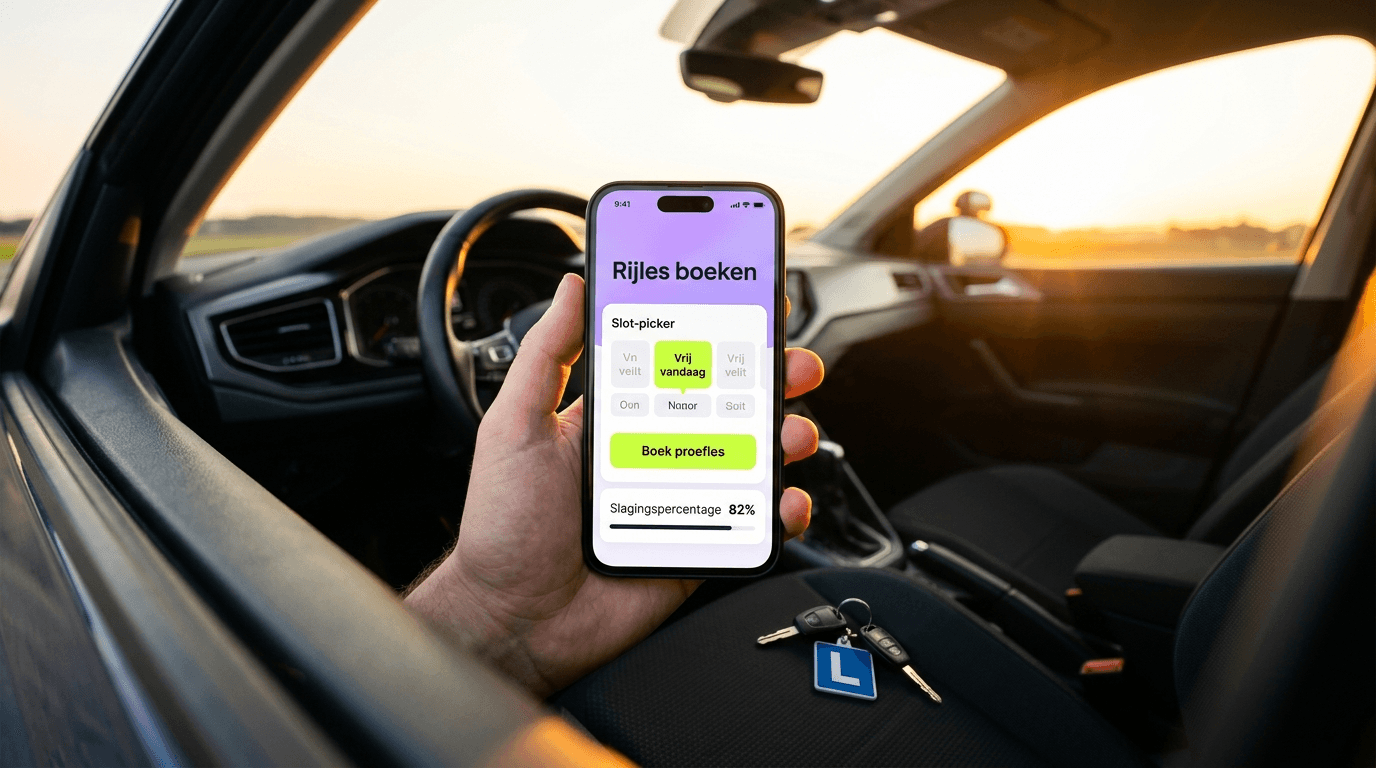
A driving school wins or loses clients on two fronts: Google reviews and direct bookability. With a bio link, you bundle lesson bookings, trial lessons, reviews, and socials on one mobile page that you print on business cards, stick on your car, and share via TikTok. Scroll to the 5-step checklist to set up your own driving school bio link today.
⚡ More students through one link. Jump to the 5-step checklist, or try LinkDash for free.
Definitions: what do we actually mean?
- Bio link
- In one sentence: A mobile landing page with all your important links, placed in your Instagram bio, TikTok profile, or on a business card.
- Trial lesson funnel
- In one sentence: The journey from first click to booked trial lesson, including form or Calendly integration.
- Google Business Profile (GBP)
- In one sentence: Your free business listing on Google Maps where reviews, opening hours, and contact details come together.
- NAP consistency
- In one sentence: Name, address, and phone number listed identically across all online platforms — crucial for local SEO.
- QR code
- In one sentence: A scannable code that sends visitors directly to a URL, ideal for physical touchpoints like business cards or car decals.
- Payment link (Stripe/Square)
- In one sentence: A direct payment link allowing students to pay for lessons or packages upfront without a separate invoicing process.
Why does a driving school need a bio link?
Short answer: Because your potential students come through at least five channels — Instagram, TikTok, Google, word-of-mouth, and your lesson car — and you need the same working link everywhere.
The average driving school doesn't have a marketing department. You're the instructor, entrepreneur, bookkeeper, and customer service all in one. Yet you're competing locally with dozens of other schools targeting the same search term: "driving school [city name]."
Google determines your ranking based on three factors: relevance, distance, and authority. That last one Google measures primarily through reviews and consistent business information. A bio link helps on both fronts:
- Collecting reviews becomes frictionless — you share one QR code after every passed test
- NAP consistency — your bio link contains exactly the same business name, address, and phone number as your GBP
- Direct conversion — no "contact us," but "book your trial lesson now"
Additionally: according to BrightLocal's 2024 Local Consumer Review Survey, 76% of consumers "regularly" read online reviews when browsing for local businesses. A bio link is mobile-first by design. Your website from 2016 isn't.
How do you set up a trial lesson button with Calendly or Cal.com?
Short answer: Create a free Calendly or Cal.com account, set up a "Trial Lesson 45 min" event type, and embed the link in your bio link as the primary CTA button.
Step-by-step: Calendly integration
- Create account — Go to calendly.com and create a free account with your driving school email
- Set up event type — Choose "One-on-One," name it "Free Trial Lesson (45 min)" and set your availability
- Add buffer time — Set 30-minute buffers between appointments for travel time
- Intake questions — Add questions: "Which neighbourhood should I pick you up in?" and "Do you have any driving experience?"
- Copy link — Copy your Calendly link (e.g., calendly.com/ace-driving-school/trial)
- Add to bio link — Paste the link into your LinkDash dashboard as the primary button
Cal.com as a free alternative
Cal.com offers a generous free tier with unlimited bookings. The interface is open-source and highly customisable, which works well for driving schools that want full control over their booking flow. You also get iCal sync so bookings appear directly in your Google Calendar.
Custom form if you want more control
Some instructors prefer a custom intake form via Tally or Typeform. This gives more control over questions and prevents students from booking unrealistic time slots. You embed the form as a pop-up or link directly from your bio link.
| Tool | Free tier | iCal sync | Intake questions | Payments | Best for |
|---|---|---|---|---|---|
| Calendly | 1 event type | ✓ | ✓ | Paid plan | Established schools |
| Cal.com | Unlimited | ✓ | ✓ | ✓ | Tech-savvy instructors |
| Tidycal | Unlimited | ✓ | ✓ | ✓ (Stripe) | Solo instructors |
| Tally (form) | Unlimited | Via Zapier | ✓✓ | Via integration | Detailed intake |
| Google Forms | Unlimited | ✗ | ✓ | ✗ | Budget option |
| LinkDash native | ✓ | Via embed | Via embed | ✓ | All-in-one |
How do you collect Google Reviews via a QR code after a passed test?
Short answer: Print a QR code that links to your Google Review page, laminate it, and give it to every student immediately after passing — that's when the emotion (and therefore willingness to review) is highest.
Why timing is everything
A student who just passed experiences a dopamine spike. The instructor who made that possible gets a share of that positive association. This is the perfect moment to ask: "Would you mind leaving a review? It helps enormously."
Wait until the next day, and the emotion has faded along with the motivation.
Technical setup
- Find your Google Review link — Search for your driving school on Google, click "Write a review," copy the URL
- Shorten the URL — Use a tool like Bitly or your own bio link with UTM tracking
- Generate QR code — QR Code Generator (free) creates a PNG you can print
- Print and laminate — A6 size works well, keep three in your car
- Script your ask — "Congratulations! May I give you this card? A review helps other students find me."
Review link in your bio link
Also add a permanent "Leave a review" button to your bio link. This works for students who follow you on social media and decide to review later. Don't make it the primary CTA (that stays the trial lesson button), but keep it visible in your link list.
Can you sell theory materials and e-learning through your bio link?
Short answer: Yes. With a mini-shop in your bio link, you sell theory packages, dashcam tips, or e-learning modules without a separate webshop. Ideal for passive income alongside your teaching hours.
What can you sell?
- Theory books + online access — Bundle physical book with access code, margin around £8-12 per sale
- E-learning modules — Partner with a theory provider and earn commission, or create your own videos
- Dashcam compilations — "10 hazardous situations explained" as a paid download (£4.99)
- Exam tips PDF — Free as a lead magnet, or £2.99 for the extended version
- Lesson packages upfront — 10-lesson card with discount, directly payable
Why this works
Driving lessons are time-bound: you can teach a maximum of 8-10 hours per day. Digital products scale without extra time. Selling a theory book costs you 2 minutes (forwarding the order), but generates £10 margin. That's £300/hour equivalent.
How do you set up Stripe or Square payment links for lesson packages?
Short answer: Create a payment link via Stripe Payment Links or Square, and add it to your bio link. Students pay upfront, you have fewer no-shows and less admin.
Option 1: Stripe Payment Links
Stripe is the standard for UK and US online payments, supporting cards, Apple Pay, and Google Pay. You create a payment link per product (e.g., "10-lesson package £650") and paste it into your bio link. Transaction fees: 1.4% + 20p for UK cards.
Option 2: Square
Square works well if you also want in-person payment options. Create checkout links from your Square dashboard for specific amounts. Particularly useful in the US market. Transaction fees: 1.9% + 20p online.
Option 3: PayPal.me
For smaller amounts or quick payments, PayPal.me links work. You create a simple link (paypal.me/yourdrivingschool/650) that students can click. Downside: less professional appearance and higher fees than Stripe.
Upfront payment = fewer no-shows
A student who pays £650 upfront for a 10-lesson card shows up. A student who "will pay next week" cancels. Upfront payment via your bio link reduces no-shows by an estimated 40-60% (based on driving instructor experiences in online communities, no formal research).
How does a bio link boost your local SEO?
Short answer: By consistently listing your NAP (name, address, phone) on your bio link, socials, and Google Business Profile, you build "citations" that Google uses to determine your local authority.
What are citations?
Citations are mentions of your business name, address, and phone number on external websites. Google crawls these and compares them. The more consistent, the more trustworthy your business appears.
Bio link as citation hub
Your bio link often gets linked from:
- Instagram bio
- TikTok profile
- Facebook page
- LinkedIn profile
- Local business directories
If all these sources point to the same bio link, and that bio link contains your correct NAP, then every link strengthens your citation profile.
Practical tips
- Use exactly the same business name — "Young Drivers Academy" is not the same as "Young Driver's Academy"
- List your registered business address — even if you don't have a physical office
- Link to your GBP — a direct link to your Google Maps listing strengthens the connection
- Add opening hours — consistency with your GBP hours
What TikTok and Reels content works for driving schools?
Short answer: Exam tips, common mistakes, and "day in the life" content. The link-in-bio converts viewers to trial lessons when your CTA is clear.
Content that works
| Content type | Example | Conversion potential | Production time |
|---|---|---|---|
| Exam tips | "3 mistakes that fail you at roundabouts" | High | 15 min |
| POV driving lesson | Dashcam compilation with voiceover | Medium | 30 min |
| Pass moments | Student's reaction after passing (with permission) | High | 5 min |
| Mythbusters | "Can the examiner make a mistake?" | Medium | 20 min |
| Behind the scenes | "What my day looks like as an instructor" | Low | 10 min |
| Q&A | Answer questions from comments | Medium | 10 min |
Link-in-bio CTA
Every video ends with a call-to-action. Not "follow for more," but "link in bio for free trial lesson in [city]." Your bio link must immediately deliver on that promise: trial lesson button at the top, no scrolling needed.
Local hashtags
Use local variants alongside general hashtags (#drivinglessons, #drivingschool): #drivinglessonsLondon, #drivingschoolManchester. This helps the algorithm show your content to people in your service area.
Scenarios per type of driving school
Solo instructor (1 car, 1 person)
You don't have a website and no marketing budget. Your bio link is your digital home base. Focus on: trial lesson bookings via Cal.com (free), Google Reviews via QR card, and one social channel where your target audience lives (often TikTok for 17-25 year olds).
Priority: Review collection. With 50+ reviews you'll rank higher than competitors with an expensive website but 12 reviews.
Small driving school (2-4 instructors)
You probably have a WordPress site that nobody updates. Your bio link becomes your conversion page, your site becomes your SEO anchor. Add payment links for lesson packages and a mini-shop for theory materials. Each instructor gets their own QR card linking to the same review page.
Priority: Upfront payment via Stripe. Less admin, fewer no-shows.
Franchise location
You work under a national brand but run your own branch. Your bio link needs to be locally distinctive while following brand guidelines. Focus on local content (TikToks about specific test routes in your city) and hyper-local search terms.
Priority: Local SEO differentiation. You're not just competing with other brands, but also with other franchisees.
Specialised driving school (motorcycle, HGV, nervous drivers)
Your target audience is smaller but more specific. Your bio link must immediately communicate your specialisation. Use the description and visual elements to convey your niche. Add testimonials from students with similar backgrounds.
Priority: Niche content on socials. "Driving lessons for nervous drivers: how I approach it" attracts exactly the right audience.
Driving school with multiple locations
You may need separate bio links per location, each with their own Calendly links and local content. One overarching bio link can work with a location selector at the top, but test whether this reduces conversion through extra clicks.
Priority: UTM tracking per location to see which converts best.
5-step checklist: your driving school bio link in 30 minutes
- Create account — Register on LinkDash and choose a URL (e.g., linkdash.app/ace-driving-school)
- Set up trial lesson button — Create Calendly/Cal.com event type, embed as primary CTA
- Add review link — Copy your Google Review URL, add as secondary button
- Configure payment links — Stripe payment link for your most popular lesson package, add to link list
- Generate QR code — Print bio link as QR for business cards and car decals
⚡ Want more students through your socials starting today?
LinkDash bundles your bookings, payments, and reviews on one mobile page. Ideal for driving schools that want to dominate locally without technical hassle.
Try LinkDash for free → no credit card · 5 minute setup
Edge cases and common mistakes
"Should I replace my website with a bio link?"
No. Your website remains valuable for SEO (longer content, local landing pages). Your bio link is your conversion page for social traffic. Think of them as complementary: website for Google, bio link for Instagram/TikTok.
"Can I put multiple locations in one bio link?"
Technically yes, but test the conversion. Every extra click costs you potential students. Consider separate bio links per location with their own local branding.
"What if students prefer to call rather than book online?"
Add a click-to-call button alongside your Calendly link. Some audiences (older career changers, nervous drivers) prefer personal contact before booking. Give them that option.
"How do I prevent spam bookings via Calendly?"
Add a required intake question that takes some effort, like "Which neighbourhood should I pick you up in?" Spam bots won't fill this in. Also consider CAPTCHA integration if the problem persists.
"Is it pushy to ask for a review right after the test?"
Not if you frame it well. "May I give you this card? A review helps other students find me" is friendly and honest. Avoid: "Can you give 5 stars?" — that's manipulative and violates Google's guidelines.
Disclaimer: these edge cases are based on frequently asked questions in driving instructor communities and general marketing principles. Test what works for your specific situation and target audience.
Disclaimer and sources
This article provides general information about marketing for driving schools. The tools and strategies mentioned are suggestions, not guarantees of results. Transaction fees and features of external services may change. Always check current terms with the relevant provider.
Sources and further reading:
- Google Business Profile Help — support.google.com/business
- Calendly Help Center — help.calendly.com
- Stripe Payment Links documentation — stripe.com/docs/payment-links
- Cal.com — cal.com
- BrightLocal Local Consumer Review Survey 2024 — brightlocal.com/research/local-consumer-review-survey
Frequently asked questions
What is a bio link for driving schools?
A bio link for driving schools is a mobile landing page that bundles all your important links: book a trial lesson, leave reviews, pay for lesson packages, and follow socials. You place this single link in your Instagram bio, TikTok profile, and on business cards.
What is a trial lesson funnel?
A trial lesson funnel is the journey from first click to booked trial lesson, including form or Calendly integration. An effective funnel minimises the number of steps between interest and booking.
What is NAP consistency and why is it important for driving schools?
NAP consistency means listing your name, address, and phone number identically across all online platforms. This is crucial for local SEO because Google compares this information to determine your trustworthiness.
What is a Google Business Profile?
A Google Business Profile (GBP) is your free business listing on Google Maps where reviews, opening hours, and contact details come together. It's the most important factor for local discoverability of driving schools.
How do I integrate Calendly with my bio link?
Create a free Calendly account, set up a "Trial Lesson" event type with your availability and intake questions, copy the link, and add it to your bio link as the primary CTA button.
When is the best time to ask for a Google Review?
Immediately after a passed test. That's when emotion is highest and willingness to review is at its peak. Give a QR card that links directly to your Google Review page.
What payment options can I add to my driving school bio link?
You can add Stripe Payment Links (cards, Apple Pay), Square, or PayPal.me. Stripe works best for lesson packages, Square for combined online/in-person payments, and PayPal for quick smaller amounts.
What TikTok content works best for driving schools?
Exam tips, common mistakes, and pass moments convert best. Use local hashtags (#drivinglessonsLondon) and end every video with a CTA to your link-in-bio for a free trial lesson.
Can I sell theory materials through my bio link?
Yes. With a mini-shop in your bio link, you sell theory packages, e-learning modules, or dashcam tips without a separate webshop. This generates passive income alongside your teaching hours.
How many Google Reviews does a driving school need to rank locally?
There's no magic number, but driving schools with 50+ reviews typically rank higher than competitors with fewer reviews, regardless of website quality. Focus on consistent review collection after every passed test.
Should I replace my website with a bio link?
No. Your website remains valuable for SEO with longer content and local landing pages. Your bio link is your conversion page for social traffic. Think of them as complementary: website for Google, bio link for Instagram and TikTok.
How do I prevent no-shows for driving lessons?
Upfront payment via payment links in your bio link reduces no-shows significantly. A student who pays £650 upfront for a 10-lesson card shows up. Add Stripe or Square payment links for your most popular lesson packages.
Ready to get started?
A bio link isn't a luxury for driving schools — it's your digital business card, booking system, and review machine in one. Start today with the 5-step checklist and see the first bookings come in within a week.
Related articles:
Andreas
Founder of LinkDash
Andreas is the founder of LinkDash. Since 2025 he has been building a European Linktree alternative with Wero and iDEAL payments, AI tools and server-side rendering for maximum GEO/SEO performance.
Ready to get started?
Create your own link-in-bio page for free with iDEAL, Wero and 100+ templates.
Start free