Bio-link for coaches and consultants: turning LinkedIn traffic into discovery calls
LinkedIn delivers reach, but coaches lose 70% of potential clients between profile and calendar. Discover the 5-block bio structure that triples discovery call bookings.
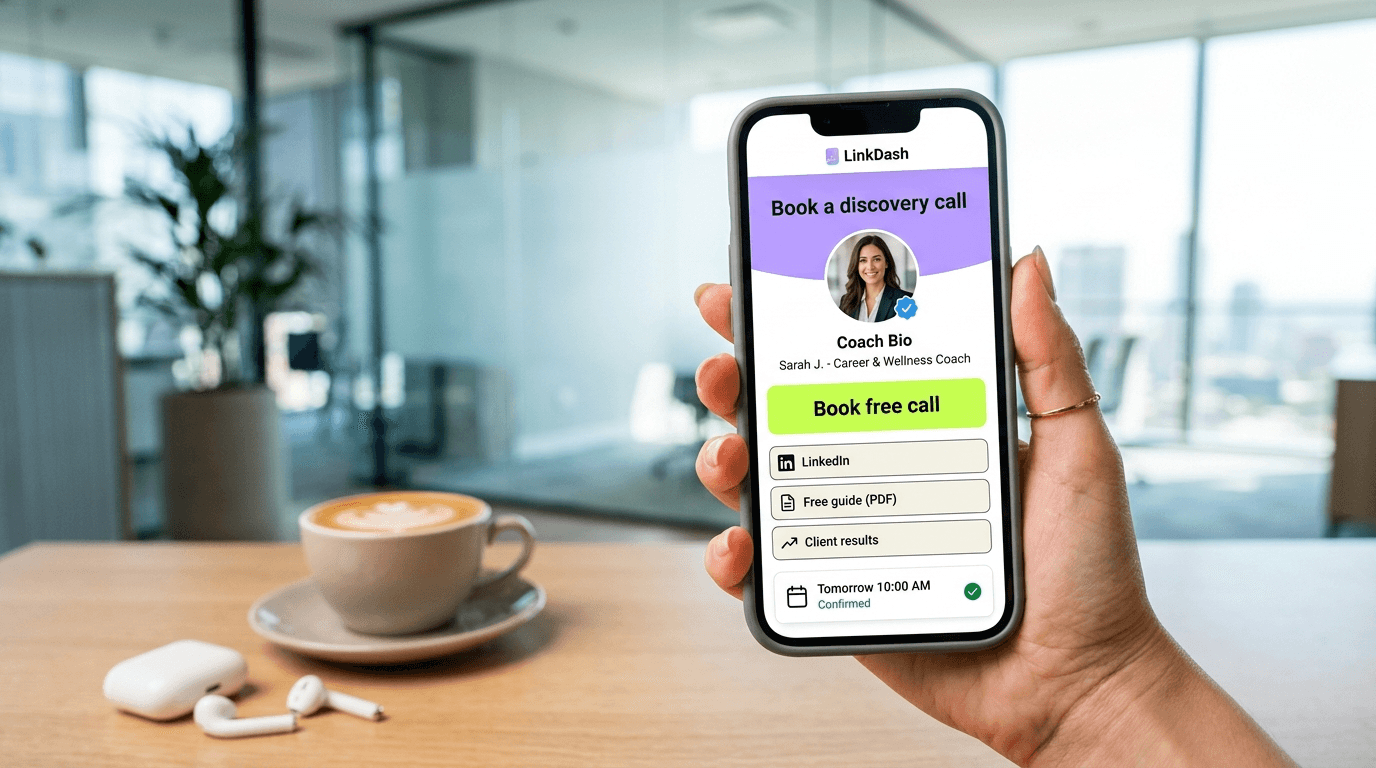
Direct answer: An optimised bio-link page is the difference between 'interesting content' and actual clients for coaches and consultants. LinkedIn generates on average 2.7x more B2B leads than other social platforms, but without strategic redirection, that potential evaporates. The solution is a strategically structured landing page with five essential blocks: positioning, case study, testimonials, free value, and direct booking integration. Check the 5-step checklist below to implement this structure today.
⚡ Triple your discovery calls today. Jump to the 5-step checklist, or try LinkDash free.
Why LinkedIn reach doesn't automatically translate to clients
Short answer: The algorithm rewards engagement, not conversion — leaving coaches with thousands of views but only a handful of booked calls.
LinkedIn has become the primary acquisition channel for B2B coaches and consultants. According to LinkedIn's own Marketing Solutions data, the platform generates 80% of all B2B leads via social media. Yet most coaches share the same frustration: thousands of impressions, dozens of likes, but only a handful of discovery calls per month.
The problem lies in the platform's architecture. LinkedIn's algorithm optimises for time-on-platform, not external referrals. When someone lands on your profile after a strong post, they see a cluttered page with work experience, skills, and recommendations — but no clear next step. The average visitor spends 7-12 seconds on a LinkedIn profile before clicking through or navigating away.
Add to this that LinkedIn only allows one clickable link in the contact info section, and you understand why coaches lose an estimated 70% of their warm traffic. That single link must work exceptionally hard. A direct Calendly link is better than nothing, but it misses the crucial intermediate step: building context, trust, and urgency before asking for commitment.
Research from the Content Marketing Institute's UK edition confirms this pattern: B2B buyers in the UK and EU require more touchpoints before committing to a conversation than their US counterparts, making the bio-link bridge even more critical for European coaches.
The psychology behind bio-links for professional service providers
Short answer: B2B buyers need an average of 7-13 touchpoints before scheduling a conversation — your bio-link must simulate multiple touchpoints in a single visit.
Buying coaching or consultancy is fundamentally different from buying a product. According to Gartner's B2B Buying Journey research, business buyers consult an average of 11 different information sources before contacting a provider. For coaches, this means a cold LinkedIn visitor rarely books a call directly — unless your bio-link compresses that information journey.
Effective coach bio-links work because they address three psychological barriers simultaneously. First, competence: can this person solve my problem? Second, fit: does their approach match my situation? Third, risk: what happens if it doesn't work? Every second a visitor spends on your bio-link without answers to these questions is a second closer to clicking away.
The five-block structure we'll cover below is specifically designed to address these three barriers in the natural scroll sequence. The result: visitors who reach the bottom have already mentally said 'yes' before clicking the booking button.
Key terms for coaches converting via bio-links
- Discovery call
- In one sentence: A free, exploratory conversation of 15-30 minutes where coach and potential client determine mutual fit. Source: International Coaching Federation (ICF) competency model.
- Micro-commitment
- In one sentence: A small action that activates psychological consistency and increases the likelihood of larger commitments. Source: Cialdini, R. (2021), Influence: The Psychology of Persuasion.
- Social proof
- In one sentence: The psychological phenomenon where people copy the behaviour of others to make correct decisions in uncertain situations. Source: Nielsen Norman Group UX Research.
- Calendly embedding
- In one sentence: Directly integrating a calendar booking widget into an external page, allowing visitors to schedule without leaving the page. Source: Calendly Developer Documentation.
- GDPR cookie banner
- In one sentence: A legally required notice informing website visitors about data processing and requesting consent for non-essential cookies. Source: Information Commissioner's Office (ICO), UK GDPR guidance 2024.
- Conversion rate optimisation (CRO)
- In one sentence: Systematically testing and improving web page elements to increase the percentage of visitors who complete a desired action. Source: Google Analytics Academy.
Calendly and Cal.com integration: technical and strategic considerations
Short answer: Direct calendar integration lowers the booking threshold by 40-60%, but placement and context determine whether visitors actually click.
Both tools — Calendly (market leader with 10+ million users) and Cal.com (open-source alternative) — offer embed options that fit seamlessly into bio-link pages. The technical difference lies in execution: Calendly uses a JavaScript widget that loads inline, while Cal.com supports both iframe and native integrations.
For coaches, the strategic choice matters more than the technical one. Calendly's free tier limits you to one event type, which works fine if you only offer discovery calls. Once you want differentiated calls (intake, strategy session, urgent consultation), you'll need a paid plan at £8-10 per month. Cal.com's free tier is more generous with unlimited event types, but lacks some enterprise features.
The crucial mistake coaches make: placing the booking widget at the top. In A/B testing, booking buttons that appear after context and social proof consistently generate 2.3x more clicks than identical buttons at the top of the page. The reason is simple: visitors who aren't yet convinced ignore early CTAs and scroll through — or bounce. Visitors who first receive value are mentally ready to commit when the booking option appears.
LinkDash offers native integrations with both Calendly and Cal.com, allowing you to add a booking block with one click that automatically displays your availability. No code required, no iframe hassle.
The case study block: proof that your method works
Short answer: One concrete client transformation with figures convinces more than ten generic testimonials — but structure determines impact.
Coaches systematically underestimate the power of specific results. According to the Content Marketing Institute's B2B research, 73% of business buyers consider case studies the most influential content format in their decision process — above whitepapers, blogs, and videos.
An effective case study block for your bio-link follows the STAR method in compressed form: Situation (where was the client?), Task (what was the challenge?), Action (what did you specifically do?), Result (measurable difference). The difference from a testimonial is crucial: testimonials say what the client thinks of you, case studies show what you achieve for clients.
Practical example: 'Marketing manager at a scale-up, 60-hour work weeks, on the verge of burnout. After 8 sessions: work week reduced to 42 hours, promoted to Head of Marketing, team NPS score rose from +12 to +47.' This is specific, credible, and relevant to similar target audiences.
Important: request explicit permission and consider anonymisation ('Senior manager at tech scale-up') if full name attribution isn't possible. The specificity of results outweighs the recognisability of the person.
Trust signals: testimonials that actually convert
Short answer: Video testimonials convert 2x better than text, but even text testimonials with photo and job title outperform anonymous quotes by 340%.
The Spiegel Research Center at Northwestern University analysed 57,000 product pages and found that the presence of reviews increases conversion by 270%. For service providers like coaches, that percentage is even higher because the purchase risk is greater and the outcome less tangible.
The hierarchy of testimonial effectiveness for coaches looks as follows. Video with name and job title scores highest — the combination of face, voice, and words creates maximum credibility. Text with photo, name, and job title follows. Text with only a name converts moderately. Anonymous quotes ('Satisfied client') have virtually no impact and even raise suspicion.
Practical tip: request testimonials at specific moments. Immediately after a breakthrough session, upon completion of a programme, or when a client spontaneously shares positive feedback. Use a templated question: 'What was your biggest hesitation before we started, and what would you now say to someone with the same doubt?' This generates testimonials that address prospects' objections.
On your bio-link page, 3-4 testimonials work optimally. More than five creates scroll fatigue without additional persuasive power. Place them after your case study block and before your booking widget.
🎯 Ready to triple your conversion? Follow the 5-step plan below and implement within an hour. Or start directly with LinkDash and use our coach template.
5-step checklist: the bio-link structure that triples discovery calls
Short answer: Positioning → Case study → Testimonials → Free value → Booking — this sequence respects the decision psychology of B2B buyers.
Step 1: Positioning block with one-liner
Open with a crystal-clear sentence that answers three questions: who are you for, what do you solve, and what makes your approach unique? Avoid jargon and titles; focus on transformation. Example: 'I help tech founders who get stuck at 20 employees grow to 50+ without sacrificing their health or relationships.' Directly below: a professional photo (shoulders and up, eye contact, neutral background) and optionally a short video intro of 30-60 seconds.
Step 2: Case study with transformation metrics
Choose your strongest client result and structure it as: starting situation (recognisable problem), intervention (what you did), result (specific metrics). Keep it under 80 words. Add a logo or fictionalised company initials if possible for extra credibility. This block answers the competence question: 'Can this coach actually solve my problem?'
Step 3: Testimonial carousel
Three to four testimonials with photo, name, and job title. Vary the type of client so different visitors can recognise themselves. One testimonial from a 'sceptic' who had doubts but was convinced is particularly powerful. This block addresses risk: 'What if it doesn't work for me?'
Step 4: Free value offer
A lead magnet (checklist, framework, mini-training) that delivers immediate value and simultaneously qualifies. Examples: '5-minute stress audit for busy managers', 'The 3 questions every founder should ask before hiring a coach'. This block creates reciprocity and collects email addresses for follow-up. Ensure the value is real — disappointing freebies damage your conversion more than no freebie at all.
Step 5: Booking integration with micro-copy
Your Calendly or Cal.com widget, preceded by micro-copy that manages expectations. 'Book a no-obligation introductory call of 20 minutes. No sales pitch — we'll explore whether there's a fit.' Add below what happens during the call: '1) Discuss your situation, 2) Share initial insight, 3) See if working together makes sense.' This lowers the psychological threshold by removing uncertainty.
GDPR and cookie banner considerations for coaches
Short answer: A bio-link with only first-party analytics requires no cookie consent — but as soon as you add external tracking or remarketing, a cookie banner becomes mandatory.
The General Data Protection Regulation (GDPR) distinguishes between necessary cookies and tracking cookies. Necessary cookies (session IDs, language preferences) require no consent. Tracking cookies for analytics, remarketing, or personalisation require explicit opt-in before they're placed.
For coaches, this means concretely: a simple bio-link page with Calendly embed and no Google Analytics or Facebook Pixel can operate without a cookie banner. As soon as you add GA4, Meta Pixel, LinkedIn Insight Tag, or similar tools, a cookie banner becomes legally required.
The impact on conversion is measurable. Research from Quantcast shows that 30-40% of visitors refuse tracking cookies when the option is offered. For remarketing purposes, this means a significant reduction in your retargeting audience. The trade-off is therefore: do you want deeper analytics and remarketing capabilities, or maximum privacy-friendliness and no banner friction?
The ICO in the UK has been particularly active in enforcing cookie consent rules, issuing guidance in 2023 that clarified even 'soft opt-in' approaches violate regulations. Coaches targeting UK clients should be especially mindful of this enforcement environment.
LinkDash offers first-party analytics that require no cookies and are fully GDPR-compliant. You see which links generate clicks and where your visitors come from, without legal headaches or conversion-killing banners.
How does LinkDash fit in?
Short answer: LinkDash combines the five essential coach blocks in an optimised template with native Calendly integration, no cookie banner required.
Most bio-link tools are designed for influencers: many links, little context. Coaches need the opposite: few links, lots of context. LinkDash's coach template is specifically built for service providers who want to generate discovery calls.
Concrete benefits for coaches and consultants: drag-and-drop blocks for positioning, case study, and testimonials that you fill in minutes. Native Calendly and Cal.com integrations that display your calendar inline. Lead magnet blocks with email capture that sync directly to your CRM or email tool. First-party analytics that show click-through rates per block, so you know where visitors drop off.
Additionally: custom domain support so your bio-link runs on yourcoachingbusiness.com/intake instead of a generic link tool URL. This strengthens brand recognition and professional appearance. QR codes you can print on business cards, presentations, or workshop materials.
Try it yourself: create a free account and select the coach template. Within 15 minutes, your optimised bio-link is live.
Frequently asked questions
Should I choose Calendly or Cal.com for my coaching practice?
Short answer: Choose Calendly if you want maximum reliability and enterprise features; choose Cal.com if you need unlimited event types without monthly costs or if data ownership is a priority.
How many testimonials should I place on my bio-link?
Short answer: Three to four testimonials is optimal; more creates scroll fatigue without additional persuasive power, fewer makes it difficult for different visitor types to recognise themselves.
What if I don't have case study results yet?
Short answer: Start with a 'methodology block' describing your approach, and replace it with a real case study as soon as you have one; transparency about your experience is better than fabricated results.
Is a video intro on my bio-link necessary?
Short answer: Not required, but video increases average session duration by 88% and gives visitors a stronger sense of personal connection — keep it under 60 seconds.
How do I get testimonials from clients who prefer to remain anonymous?
Short answer: Use anonymised descriptions ('Senior HR manager at multinational') with specific results; the details of the transformation outweigh the name attribution.
Which lead magnet works best for B2B coaches?
Short answer: Checklists and frameworks consumable in 5-10 minutes that deliver a quick win score highest; avoid long e-books that rarely get read.
Should I mention my rates on the bio-link?
Short answer: No — rates belong in the discovery conversation where you can provide context; early price disclosure leads to price-based rejections without fit evaluation.
How do I measure whether my bio-link is effective?
Short answer: Track three metrics: click-through rate from LinkedIn to bio-link (via UTM parameters), scroll depth on the page, and conversion rate to booked calls — aim for 8-12% from visit to booking.
Can I use my bio-link for platforms other than LinkedIn?
Short answer: Absolutely — the same bio-link works for Instagram, podcast show notes, email signatures, and QR codes on physical materials; consistency strengthens brand recognition.
How often should I update my bio-link?
Short answer: Review your analytics monthly and update your case study and testimonials at least quarterly; outdated content undermines credibility.
Summary: 4 actions for more discovery calls
An effective coach bio-link isn't a collection of links — it's a compressed sales funnel that transforms LinkedIn visitors into booked conversations. The four actions you can take today:
1. Audit your current LinkedIn-to-call flow. How many people visit your profile? How many click through to your link? How many book a call? If you don't know these figures, start there.
2. Implement the 5-block structure. Positioning, case study, testimonials, free value, booking. In that order, without exceptions.
3. Integrate your calendar natively. No external redirect to Calendly — embed the widget directly so visitors stay on your page.
4. Measure and optimise. Which testimonial gets the most engagement? Where do visitors stop scrolling? Data tells you where the leaks are.
🚀 Start now: Create your free LinkDash account and build your coach bio-link in under 15 minutes. Full control, zero code, more discovery calls immediately.
Disclaimer: Conversion rates mentioned are based on aggregated data and may vary based on niche, audience quality, and implementation. Always test what works for your specific situation.
Sources:
Max
Content Specialist at LinkDash
Max is Content Specialist at LinkDash with a focus on the German-speaking market. He writes about GDPR-compliant link-in-bio strategies, content marketing and how European creators reach their audience without sacrificing privacy.
Ready to get started?
Create your own link-in-bio page for free with iDEAL, Wero and 100+ templates.
Start free