
Bio-link for children's party entertainers: sell packages and take bookings
Learn how children's party entertainers like magicians, face painters and balloon artists use a smart bio-link to sell packages, collect deposits and prevent no-shows. Practical guide with UK and EU examples.
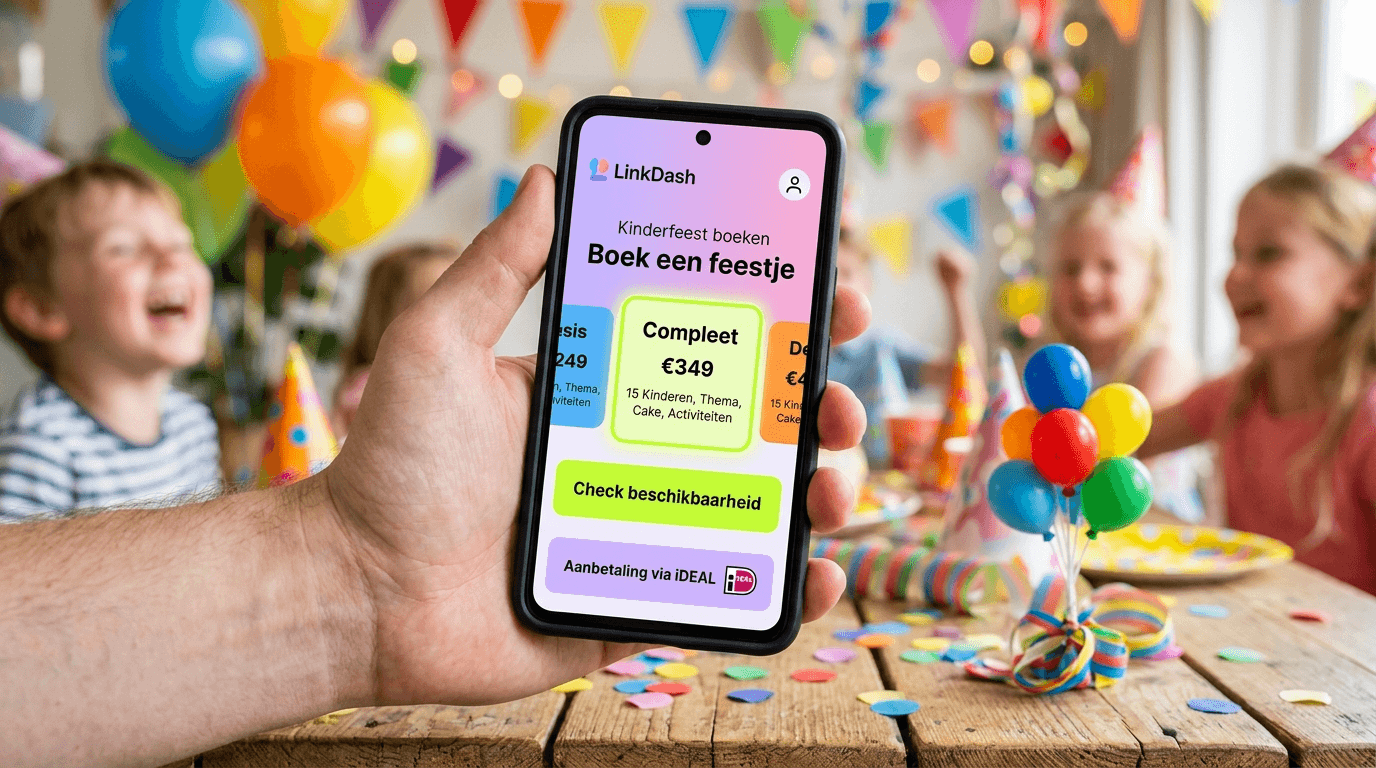
A professional bio-link replaces your outdated website and lets parents compare your packages, check availability and pay a deposit within 60 seconds — reducing no-shows by 70-80% and fully streamlining your booking process. Scroll to the 5-step checklist to get your entertainer profile live today.
⚡ More bookings, fewer no-shows. Jump to the 5-step checklist, or try LinkDash free.
Definitions: bio-link, children's party entertainer and Mini Shop
- Bio-link
- In one sentence: A mobile-optimised landing page with all your key links, content and sales features — accessible via a single URL in your social media bio.
- Children's party entertainer
- In one sentence: A professional who performs at children's birthdays and events, such as magicians, face painters, balloon artists, clowns or mascot performers.
- Mini Shop
- In one sentence: A built-in sales feature in your bio-link that lets you sell digital or physical products — like party packages — directly without an external e-commerce platform.
- No-show
- In one sentence: A booked client who fails to turn up without cancelling, causing you to lose revenue and time.
- Social proof
- In one sentence: Evidence from previous satisfied clients (reviews, photos, videos) that convinces new visitors to book.
- Deposit
- In one sentence: An upfront payment (typically 25-50% of the total price) that creates client commitment and protects you against last-minute cancellations.
Why do children's party entertainers need a bio-link?
Short answer: Parents find entertainers via Instagram or Facebook, want to see availability and pricing within minutes, and prefer to book instantly — a traditional website is too slow and complex for this decision moment.
If you work as a children's party entertainer, you know the reality: parents plan parties at the last minute. They scroll through Instagram in the evening, see your video with balloon sculptures, and want to know right now if you're free on 15 March. Every click you add between "interested" and "booked" costs you conversions.
The traditional model — visit website, fill in contact form, wait for email, back-and-forth about packages — doesn't match how parents make decisions in 2025. They're comparing you with three other entertainers in the same scroll session. Whoever makes it easiest to book, wins.
A bio-link solves this by providing:
- Direct package comparison: Basic, Premium and Deluxe side by side, with prices and inclusions
- Instant availability: Integration with your calendar so parents can check themselves
- Social proof in one place: Reviews, photos and videos from previous parties
- Deposit via Stripe or PayPal: Immediate commitment, no no-shows
- Seasonal content: Christmas shows in December, Easter entertainment in spring, automatically prominent
How do you set up package cards in a Mini Shop?
Short answer: Create three to four clear packages (Basic/Premium/Deluxe) with fixed prices, bullet-point inclusions, and a direct "Book now" button that leads to payment.
The Mini Shop feature in LinkDash is specifically designed for service providers selling packages. No complex e-commerce setup, no monthly fees for plugins — just clear product cards that parents can purchase directly.
Package structure for entertainers
The most effective structure for children's party entertainers:
| Package | Price (indicative) | Duration | Inclusions | Best for |
|---|---|---|---|---|
| Basic | £100 - £150 / €125 - €175 | 45-60 min | Core act (magic/face painting/balloons), 1 entertainer | Small parties (≤8 children) |
| Premium | £175 - £250 / €200 - €275 | 90 min | Extended act, interactive games, small gift per child | Medium parties (8-15 children) |
| Deluxe | £275 - £400 / €325 - €450 | 2-2.5 hours | Complete show, 2 entertainers or combo act, photo moment, themed decoration | Large parties (15+ children) |
| Mini | £60 - £85 / €75 - €100 | 30 min | Short act, perfect as an "extra" at school events or after-school clubs | Schools, after-school clubs, playgroups |
| Seasonal special | Variable | Custom | Christmas show, Easter entertainment, summer festival | Seasonal events |
| Corporate | On request | Custom | Corporate events, openings, festivals | B2B clients |
Package card optimisation
Each package card in your Mini Shop should include:
- Package name and price: "Premium Magic Show — £200"
- Duration and travel area: "90 minutes | Greater London" or "South East England"
- Bullet-point inclusions: Maximum 5-6 points, starting with the most valuable
- Hero photo: You in action at a real party, happy children (with permission)
- Call-to-action: "Book with £50 deposit" or "Check availability"
How do you integrate an availability calendar?
Short answer: Link to an external booking tool like Calendly, Cal.com or SimplyBook.me, or embed a live calendar widget that shows available dates directly.
Parents don't want to email asking if you're free on 22 April. They want to see it. An availability calendar eliminates this friction entirely.
Three integration options
Option 1: Direct link to Calendly/Cal.com
Add a prominent link block: "📅 Check my availability" that leads to your Calendly page. Advantage: free, reliable, professional. Disadvantage: parents leave your bio-link.
Option 2: Embedded widget
Some bio-link tools support embeds. Your calendar becomes visible within your page. Advantage: seamless experience. Disadvantage: may slow load time.
Option 3: Manual availability text
Update a text block weekly: "Available in May: 3rd, 10th, 17th, 24th, 31st". Simple but labour-intensive — only suitable if you have few bookings.
Booking tool comparison for entertainers
| Tool | Free tier | UK/EU payment integration | Best feature | Drawback |
|---|---|---|---|---|
| Calendly | Yes (basic) | Via Stripe | Ease of use, brand recognition | Limited free features |
| Cal.com | Yes (generous) | Via Stripe | Open source, flexible | Steeper learning curve |
| SimplyBook.me | Yes (limited) | Yes, native | Designed for service providers | Interface less modern |
| Setmore | Yes | Via Square/Stripe | Team features | Payment setup less streamlined |
| Acuity (Squarespace) | No | Yes | Professional features | No free option |
| Reservio | Yes (limited) | Limited | Multilingual | Less well-known |
How do you build a review section with social proof?
Short answer: Actively collect reviews after every party, ask for photos/videos with permission, and display the best testimonials prominently on your bio-link with stars, names and optionally location.
Parents don't book an entertainer they don't trust. Social proof — evidence that other parents were satisfied — is the most powerful conversion factor for children's party services.
Effective social proof for entertainers
1. Embed Google Reviews
If you have a Google Business profile, link to your reviews or display your average score: "⭐ 4.9/5 based on 47 reviews." This is directly verifiable and therefore extra credible.
2. Photos from real parties
One photo of laughing children fascinated by your magic trick says more than ten lines of text. Always ask explicit permission from parents before using photos of children. Best practice: send a short message after the party asking if you may share specific photos.
3. Video testimonials
Short videos (15-30 seconds) of parents explaining how happy their child was. You can also share clips of your act — as long as children aren't identifiable, or you have permission.
4. Rating + quote format
Combine a star rating with a short quote: "⭐⭐⭐⭐⭐ — 'The children are still talking about the magic show! Highly recommended.' — Sarah, Bristol."
Review collection strategy
Send a WhatsApp or email within 24 hours of the party:
"Hi [name], thank you for letting me be part of [child's name]'s birthday! If you have a moment, a short review on Google would help me enormously. Here's the link: [Google Review link]. And if you took any nice photos, would you mind if I shared one on my page? Thanks so much!"
How do you prevent no-shows with upfront deposits?
Short answer: Request 25-50% deposit via Stripe or PayPal at the time of booking — this creates commitment and filters out non-serious enquiries, dramatically reducing no-shows.
No-shows are every entertainer's nightmare. You block a date, turn down other enquiries, and then the client cancels at the last minute — or worse, they don't show up at all. A deposit solves this.
Why Stripe and PayPal work for UK and EU entertainers
In the UK, card payments dominate online transactions, with Stripe providing seamless integration for entertainers. Across the EU, payment preferences vary by country — the Dutch favour iDEAL (70%+ of online payments), Germans use direct bank transfers, and French consumers often prefer cards. Stripe handles this complexity automatically, supporting local payment methods based on the customer's location.
LinkDash supports Stripe payments without complex integration work. You connect your account once, and payments flow automatically.
Deposit structure
| Package price | Deposit | Balance | Cancellation policy |
|---|---|---|---|
| £60 - £125 / €75 - €150 | £25 - £40 / €35 - €50 (30-40%) | On the day (cash/bank transfer) | Deposit non-refundable if cancelled <7 days |
| £125 - £250 / €150 - €300 | £40 - £85 / €50 - €100 (25-35%) | On the day or in advance via bank transfer | Deposit non-refundable if cancelled <14 days |
| £250+ / €300+ | £85 - £125 / €100 - €150 (30%) | 1 week in advance | 50% refund if cancelled >14 days, 0% <7 days |
| Corporate/festival | 50% | Invoice basis | Contract-specific |
Communicating about deposits
Be transparent. On your package card:
"Book with a £50 deposit via card payment. Balance (£150) payable on the day of the party. If you cancel within 7 days, the deposit is non-refundable — this allows me to plan my diary reliably."
This prevents surprises and filters out clients who aren't serious.
How do you use QR codes for offline marketing?
Short answer: Generate a QR code linking to your bio-link and place it on flyers, business cards and posters at schools, playgrounds, after-school clubs and local shops — reaching parents where they physically are.
Not all parents find you via Instagram. Many bookings come through word-of-mouth or local visibility. A QR code in the right place converts that offline visibility into online bookings.
Best locations for QR code flyers
- Primary schools: Notice boards at entrances, newsletters (ask the headteacher)
- After-school clubs and breakfast clubs: Notice boards, parent evenings
- Playgrounds and soft play centres: Often open to local flyers
- Nurseries and childminders: Similar to after-school clubs
- Local shops: Toy shops, children's clothing stores, cafés with play areas
- Libraries: Usually have a community board
- Sports clubs: Football clubs, gymnastics clubs — parents wait there for their children
Flyer design tips
Your flyer doesn't need to be complex:
- Headline: "Need a party entertainer? 🎈"
- One hero photo: You in action, happy children (with permission)
- 3 bullets: "Magic | Face painting | Balloons" or your specialities
- QR code: Large enough to scan easily
- Below the QR: "Scan and book directly" + your Instagram handle as backup
Avoid too much text. The QR code leads to your bio-link where all the information lives.
How do you swap seasonal content?
Short answer: Use LinkDash's scheduling feature to automatically make Christmas shows prominent in December, Easter entertainment in spring and summer festival acts in June — without manual updates.
The children's entertainment market is heavily seasonal. Christmas and panto-style acts book up in October-November. Easter brings themed entertainment. Summer fêtes and festivals need different acts. Your bio-link should reflect this.
Seasonal calendar for entertainers
| Period | Seasonal content | Display prominently |
|---|---|---|
| October - December | Christmas shows, Santa visits, winter wonderland acts | Top position, with special banner |
| January - February | Valentine's parties, half-term entertainment | Half-term focus |
| March - April | Easter shows, spring parties | Easter-themed packages |
| May - June | End-of-school-year parties, summer fêtes | School and outdoor focus |
| July - August | Summer festivals, outdoor parties, holiday clubs | Outdoor shows, festivals |
| September | Back-to-school, autumn birthdays | Standard birthday packages |
| Year-round | Birthdays, christenings, naming ceremonies | Always available as baseline |
Scheduling in practice
With LinkDash you can pre-schedule link blocks. For example:
- 1 October: "🎄 Christmas shows now booking!" automatically appears at the top
- 26 December: Christmas block disappears, half-term content takes over
- 1 March: Easter shows become prominent
This prevents your summer festival act sitting at the top in December, or forgetting to activate your Christmas content.
5-step checklist: get your entertainer bio-link live in one afternoon
- Create account and set up basics (15 min): Register on LinkDash, choose your URL (e.g. linkdash.app/magician-mike), upload profile photo and write a 2-3 sentence intro
- Set up packages in Mini Shop (30 min): Create 3-4 package cards with prices, inclusions and hero photos. Set deposit amount (£25-£85 depending on package price)
- Connect availability and booking (20 min): Link Calendly/Cal.com or add a link block to your booking page. Test the flow yourself with a dummy booking
- Add social proof (20 min): Add 3-5 best reviews, upload 4-6 photos from previous parties (with permission), consider 1-2 short videos
- Seasonal block and QR code (15 min): Activate your first relevant seasonal link block, generate QR code, download for printing on flyers
⚡ Still losing bookings because of a slow website?
LinkDash gives you package cards, card payments and seasonal scheduling in one mobile-optimised page. Parents book while they're still excited.
Try LinkDash free → no credit card · 5 minute setup
Bio-link by entertainer type
Magician/illusionist
Focus on mystery and wow-factor. Your hero video should show a spectacular trick. Package names like "Close-up Magic" and "Stage Illusions" work well. Consider a "behind the scenes" link to TikTok/Reels where you explain tricks — this builds parasocial connection.
Face painter
Visual portfolio is crucial. Show a grid of your best designs: tiger, butterfly, superhero, princess. State explicitly: "Max 12 children per hour" so parents have realistic expectations. Consider a "themed package" where you agree a design with the child beforehand.
Balloon artist
Videos work better than photos here — the transformation from balloon to sculpture is the spectacle. List your repertoire: "100+ designs, from simple dogs to life-size dinosaurs." Use photos of your most impressive creations as eye-catchers.
Clown/comedy entertainer
Personality sells. Your bio text can be funny, your photo should radiate warmth (not creepy — many parents have "clown anxiety" for their children). Reviews specifically mentioning that children weren't scared are worth their weight in gold.
Mascot performer
Show the mascot in action, not just standing still. State which characters you offer and whether custom mascots are possible. Corporate events are often a bigger market than birthdays — consider a B2B package card.
Edge cases and common mistakes
"I already have a website, why do I need a bio-link?"
Your website doesn't disappear. The bio-link is a shortcut for social media traffic. Parents who find you via Instagram don't want to wait for your homepage to load. They want package price → availability → book. Your website remains relevant for SEO and detailed information.
"Should I list exact prices?"
Yes. "From £125" is better than nothing, but concrete prices convert better. Parents want to know what something costs before making contact. Vague pricing suggests you're expensive or hiding something.
"What if my prices vary by area?"
State your base prices plus "+ travel costs outside [area]" or work with zones. For example: "£150 within 10 miles of Bristol, + £0.45/mile beyond." Or create separate package cards per region.
"I don't want to ask for a deposit, it feels pushy"
Understandable, but no-shows literally cost you money. Frame the deposit positively: "This reserves your date — I won't accept other enquiries for it." Professional entertainers ask for deposits as standard. The UK Government guidance on refunds confirms that non-refundable deposits for services are standard practice when clearly communicated.
"Can I share photos of children?"
Only with explicit permission from parents/guardians. Request this in writing (a WhatsApp message is sufficient) and keep records. When in doubt: use photos where faces aren't identifiable, or ask parents to provide photos they're happy to share. The ICO's guidance on children's data provides detailed requirements for UK-based entertainers.
Important: The information in this article is general in nature. For specific legal questions about image rights for minors, consult a solicitor.
Disclaimer and sources
This article is written for informational purposes and does not constitute legal or financial advice. Prices and percentages are indicative and vary by region, specialisation and market conditions. For specific situations, consult a professional.
Sources and further reading:
- GOV.UK — Information on self-employment registration in the UK
- ICO.org.uk — Data protection guidance including children's images
- Citizens Advice — Consumer rights and small business guidance
- Stripe UK — Payment processing for UK and EU businesses
- Your Europe - Business — EU-wide guidance for self-employed service providers
Frequently asked questions
What is a bio-link for entertainers?
A bio-link for entertainers is a mobile-optimised landing page with all your key links, content and sales features — accessible via a single URL in your social media bio. It replaces the need for a complex website and streamlines the booking process for parents.
What is a Mini Shop?
A Mini Shop is a built-in sales feature in your bio-link that lets you sell digital or physical products — like party packages — directly without an external e-commerce platform. You create package cards with prices and parents can check out directly.
What is a no-show for children's parties?
A no-show is a booked client who fails to turn up without cancelling, or cancels last-minute after you've already blocked the date. This costs you revenue and time you can't recover.
What is social proof for entertainers?
Social proof is evidence from previous satisfied clients — such as reviews, photos and videos from parties — that convinces new visitors to book. It builds trust before parents make contact.
How much deposit should I ask for a children's party?
The standard practice is 25-50% of the total price. For packages up to £125/€150, £25-£40/€35-€50 is reasonable. For more expensive packages (£250+/€300+), you'd typically ask £85-£125/€100-€150. The deposit creates commitment and prevents no-shows.
Which payment method works best for children's party bookings?
In the UK, card payments via Stripe are the most common online payment method. Across the EU, preferences vary — Dutch customers prefer iDEAL, Germans use bank transfers, French customers often use cards. Stripe handles these automatically based on location.
How do I get reviews from parents after a children's party?
Send a WhatsApp or email within 24 hours of the party with a direct link to your Google Reviews page. Ask specifically and make it easy — the fewer clicks, the higher the chance parents will actually leave a review.
Can I put photos of children on my bio-link?
Only with explicit permission from parents or guardians. Request this in writing (WhatsApp is sufficient) and keep records. When in doubt: use photos where faces aren't identifiable, or ask parents which photos they're happy to share.
Where should I put QR codes for my entertainer services?
Effective locations include: primary schools (notice boards, newsletters), after-school clubs, playgrounds, soft play centres, local toy shops, libraries and sports clubs. Anywhere parents wait or pass through.
How do I swap seasonal content on my bio-link?
With LinkDash's scheduling feature you pre-schedule link blocks. Christmas shows appear automatically in October, Easter entertainment in March, summer festivals in June. This keeps your bio-link relevant without manual updates.
What are good package names for children's party entertainers?
Keep it simple and recognisable: Basic, Premium and Deluxe work universally. Or use descriptive names that reflect your speciality: "Close-up Magic" and "Stage Illusions" for magicians, "Mini Makeover" and "Full Face Fantasy" for face painters.
Can I keep my existing website alongside a bio-link?
Absolutely. Your bio-link is a shortcut for social media traffic, not a replacement for your full website. Parents who find you via Instagram use the bio-link. Visitors from Google find your website. Both channels complement each other.
Get started
A smart bio-link transforms how parents find, compare and book you. No endless email threads about prices and availability. No no-shows from lack of commitment. Just: choose package, pick date, pay deposit, done.
Start today with the 5-step checklist and you could receive your first booking via your new bio-link this evening.
Related articles:
Max
Content Specialist at LinkDash
Max is Content Specialist at LinkDash with a focus on the German-speaking market. He writes about GDPR-compliant link-in-bio strategies, content marketing and how European creators reach their audience without sacrificing privacy.
Ready to get started?
Create your own link-in-bio page for free with iDEAL, Wero and 100+ templates.
Start free